D.Sole case study
Lia.
Health Tech · UX Research · Dashboard Design

D.Sole

Helping a smart insole startup fit its clinician dashboard into how podiatrists actually care for diabetic feet.
Jump to a section
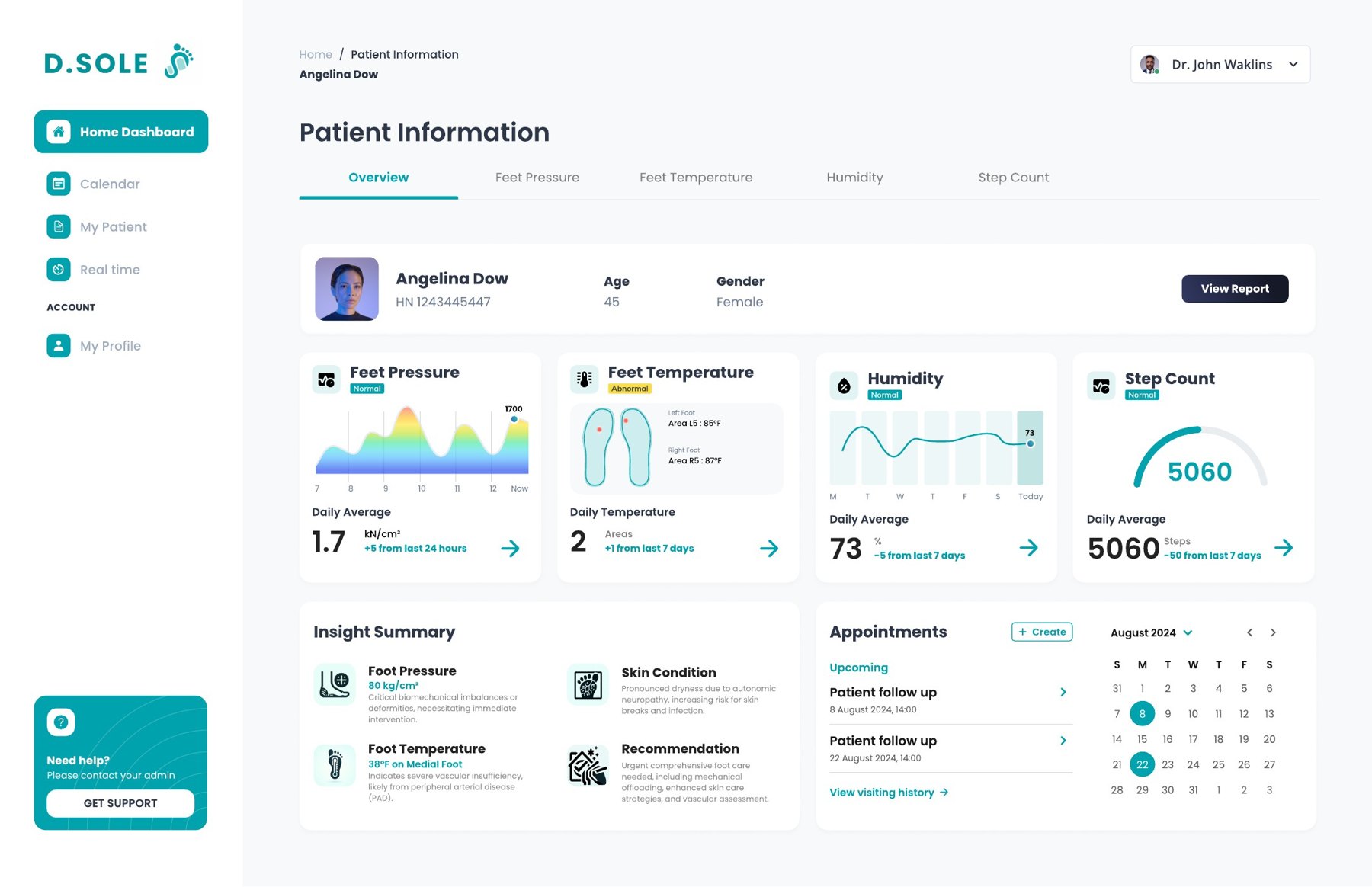
The improved D.Sole dashboard overview: four health indicators for foot pressure, temperature, humidity and step count, an insight summary, and an appointments calendar
The improved patient overview, with plain-language insights and follow-ups beside the sensor data.
My role

Planned and ran research sessions with podiatrists, synthesized findings, and designed the dashboard improvements

Context

Independent study at Carnegie Mellon, working with the D.Sole team, 2025

Methods

In-depth interviews, process mapping, card sorting, design critique with MoSCoW prioritization, service blueprint

Tools

Figma, FigJam, Zoom

In a nutshell: podiatrists saw real value in the data, but they see 30 or more patients a day. A dashboard has to tell them who needs attention and why, fast.

D.Sole makes a smart insole for people with diabetes. Sensors track foot pressure, temperature, humidity and steps, so clinicians can spot warning signs before a wound forms. Diabetic foot ulcers are a leading cause of amputation, and early signs are easy to miss.

The team had a working dashboard, but no one had tested it with the clinicians it was built for. I helped run research with practicing podiatrists, then turned what we learned into design improvements for the dashboard and the service around it.

01 · Context

A working product

The MVP dashboard showed everything the insole could measure: a foot map of pressure zones, temperature by area, humidity and step count. The open question was whether it fit how podiatrists read data and make decisions.
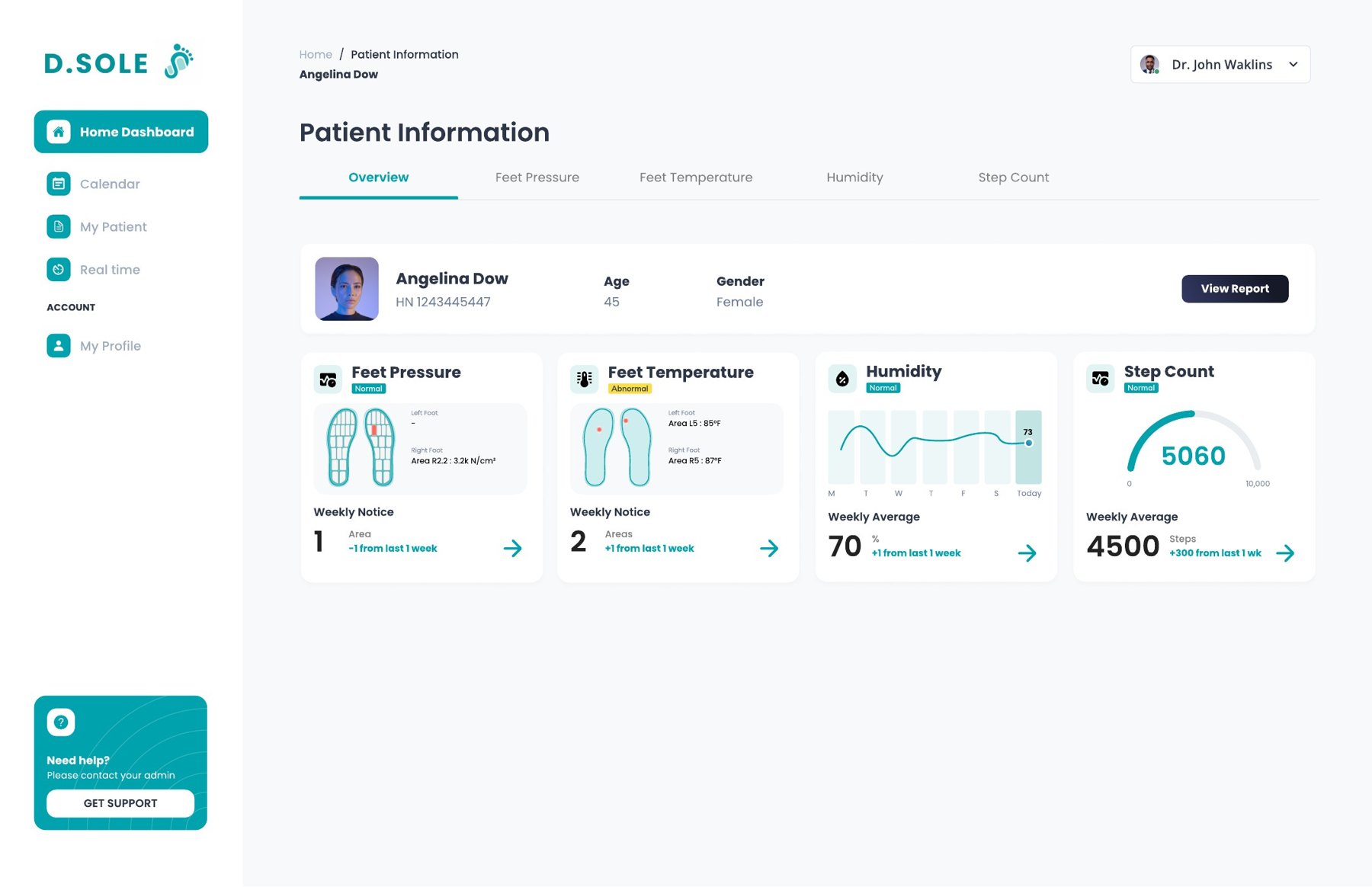
The original MVP dashboard overview with four metric cards for one patient
The MVP overview: four metrics, no interpretation.
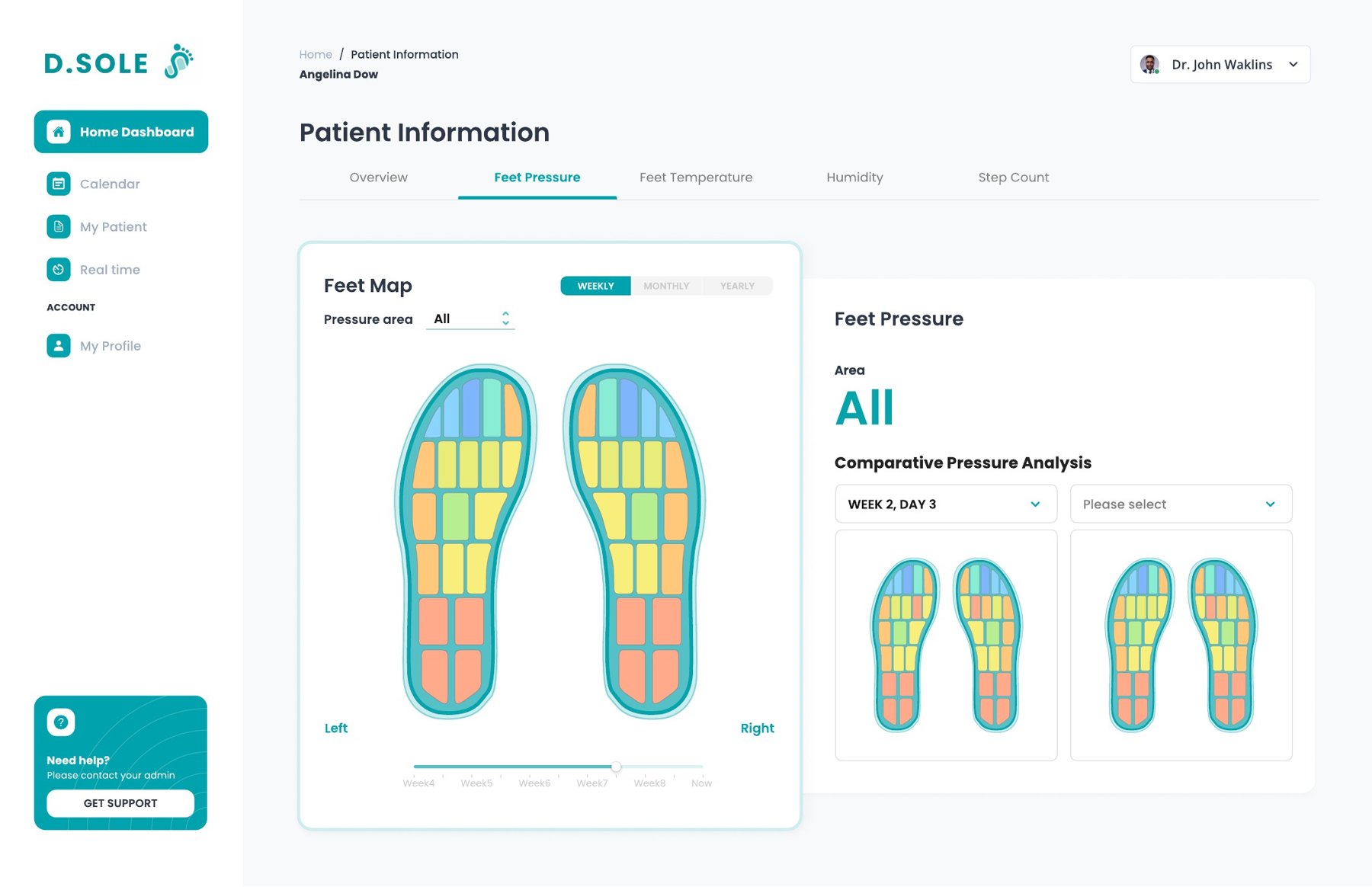
The MVP foot pressure map showing colored zones on both soles and a comparison panel
The foot pressure map, comparing zones across weeks.
Goal 01
Test usabilityNavigation, layout and how intuitive the dashboard feels.
Goal 02
Test usefulnessDo the foot map and data views actually support clinical tasks?
Goal 03
Gather design directionClarity, feature priorities and concrete improvements.
02 · Research with podiatrists

Start with their workflow, then show the product

I designed each session so podiatrists walked us through their own practice before seeing D.Sole. That way we could judge the dashboard against real routines, not first impressions. Sessions ran 60 to 90 minutes, on Zoom with FigJam or in person.
Intro
Interview: their practice
Process mapping
Demo
Design critique
Fitting D.Sole in
5m
10 to 15m
15m
3m
10m
15m
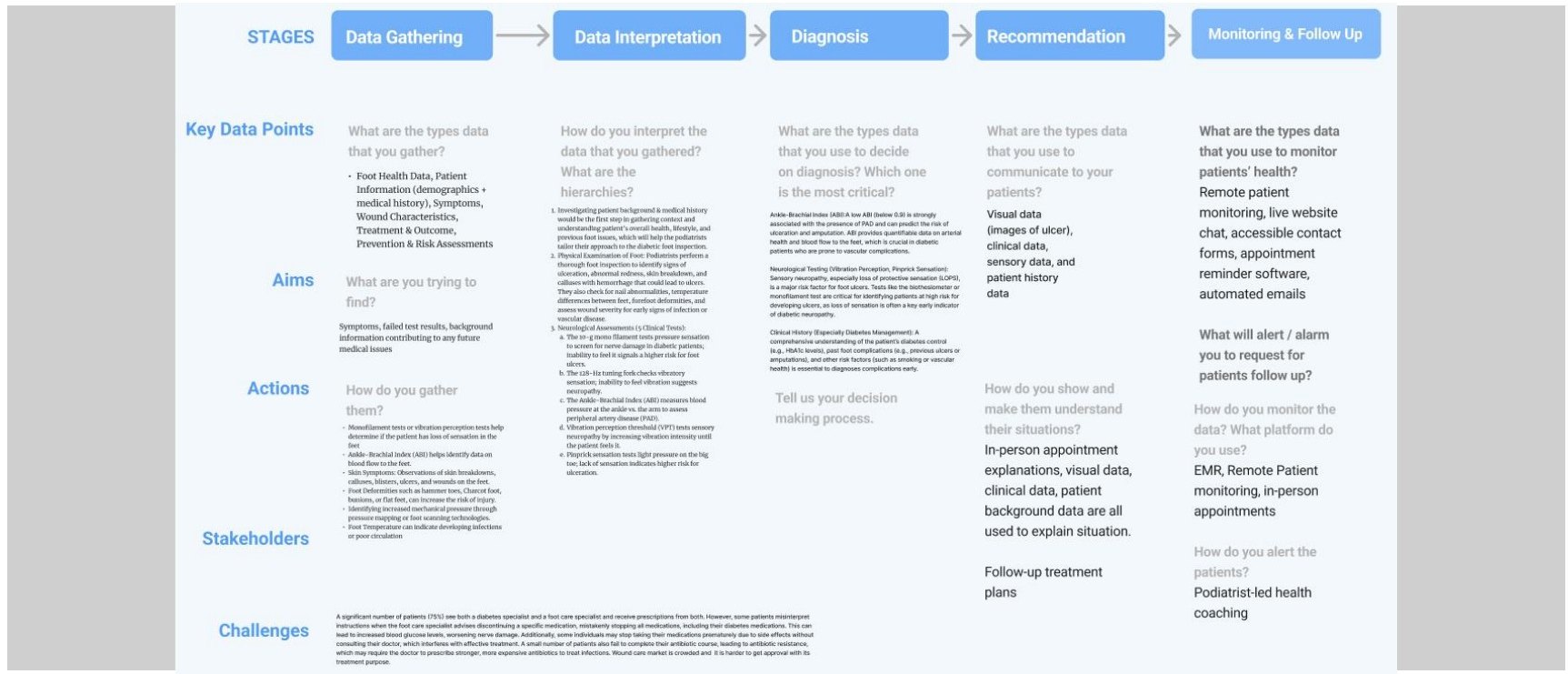
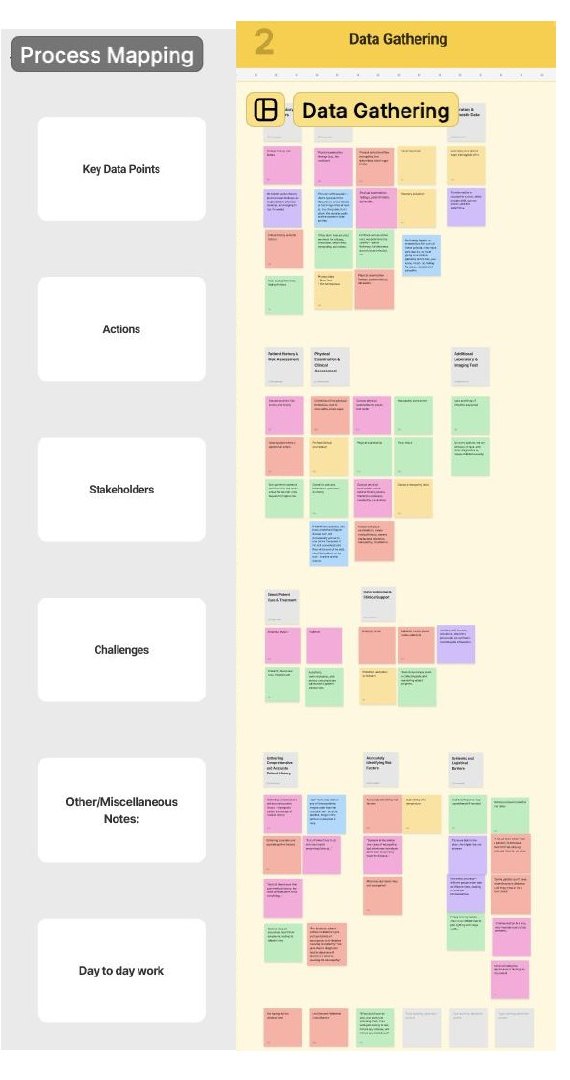
Process mappingA prefilled journey board, from gathering data to diagnosis, recommendation and follow-up. Podiatrists filled in the data, actions, people and challenges at each stage.
Card sortingCards for temperature, pressure, moisture, step count and gait. Ranking them showed which data drives their decisions.
Design critique with MoSCoWThinking aloud through the dashboard, then sorting features into must, should, could and won't have.
Journey framework template with stages: data gathering, data interpretation, diagnosis, recommendation, monitoring and follow-up, with rows for key data points, aims, actions, stakeholders and challenges
The journey framework we used to map each podiatrist's workflow.
A FigJam column of colored sticky notes from the data gathering stage, sorted by key data, actions, stakeholders and challenges
Synthesis for one stage, across all sessions.

Who we talked to

23 to 41
years in practice, from Pennsylvania to Texas, California and the Carolinas
20 to 40
patients a day, many with diabetes and from low-income backgrounds
None
had used a digital foot monitoring tool in practice

We spoke with podiatrists and primary care physicians. One summed up the skepticism: past tools like pedobarographs needed a technician to set up and were impractical in a busy clinic.

03 · What we heard

The gaps start long before the clinic visit

Mapping the full journey showed problems at every stage, many of them outside the dashboard: patients who don't know they're at risk, missing history, and treatments they can't afford.

Stage
01Getting into care
02Gathering data
03Interpreting data
04Diagnosis
05Recommendation
06Monitoring and follow-up
What happens
Patient notices a problem, or is referred, often late.
History, intake forms, a physical foot exam, referral notes.
Reviewing records and exam results, often in a few minutes.
Weighing symptoms; sometimes ordering imaging or labs.
Prescribing footwear or offloading, and explaining care at home.
Scheduled visits, with patients checking their own feet at home.
Pain points
Many don't know they have neuropathy, or even diabetes. Cost and access delay care.
Histories are incomplete and scattered across referrals. Risk is judged by eye.
No time to dig through complex data, and no shared framework across clinicians.
Many complications look alike. Patients underestimate their risk.
Footwear is expensive and slow to approve. Advice is misunderstood or not followed.
Older patients and those living alone struggle to self-monitor and fall through the cracks.
Where D.Sole can help
Insole alerts nudge an earlier visit; screening in primary care.
Continuous, standard sensor data; a simple intake mode for nurses.
An insight summary and a list of who needs attention first.
Visual risk explainers to show patients what could happen.
Clear coverage pathways; involving family in the plan.
Remote monitoring, plus encouraging messages for patients and caregivers.

Synthesized from process mapping with podiatrists. Scroll sideways on small screens.

What podiatrists valued

  • Catching problems early. Ongoing pressure, temperature and humidity data could flag risk before an ulcer forms, and make assessments more consistent.
  • Seeing between visits. Remote data means less reliance on what patients remember to report.
  • Engaging patients. Alerts and feedback could nudge people to seek care sooner, especially those with limited mobility or living alone.

What would make or break adoption

  • Speed. With 30 to 35 patients a day, it has to be quick to set up and must not drown them in information.
  • Fit with existing systems. Medical records, intake forms, and clear roles for nurses and staff.
  • Reach and coverage. Use in primary care for earlier detection, work offline in low-connectivity areas, and fit insurance reimbursement.
04 · Highlight: dashboard improvements

From showing data to guiding the next step

The MVP answered "what do the sensors say?" Podiatrists needed it to answer "who needs me, what's wrong, and what should I do?" Every change below came from that shift.
Before
MVP overview with only four metric cards
After
Improved overview with metric cards, an insight summary and an appointments calendar
Insight SummaryTurns raw readings into clinical takeaways, like a temperature drop that may point to circulation problems, with a recommended next step.
Appointments in viewUpcoming follow-ups and visit history sit next to the data, so monitoring connects to action.
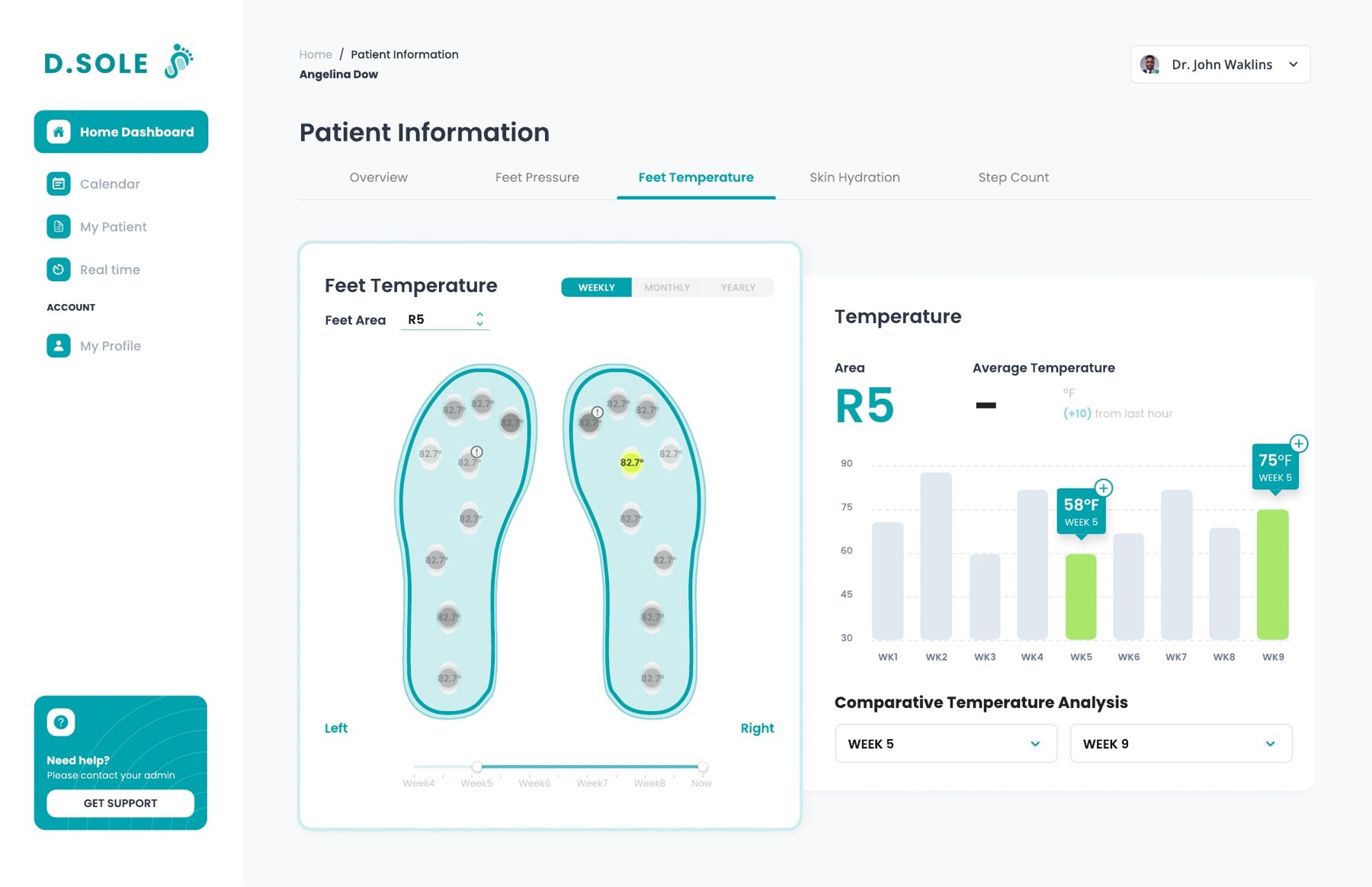
Trends, not snapshotsDaily averages with change since last week, and week-by-week charts to compare any two weeks.
Clinical language"Humidity" became "Skin Hydration" in detail views, closer to how clinicians think about skin risk.
Foot temperature detail view: a foot map with sensor areas, and a weekly bar chart for area R5 comparing week 5 and week 9
Detail view: pick a spot on the foot, see its trend, compare two weeks.

Three new features

Out of six suggested improvements, I designed these three in detail.
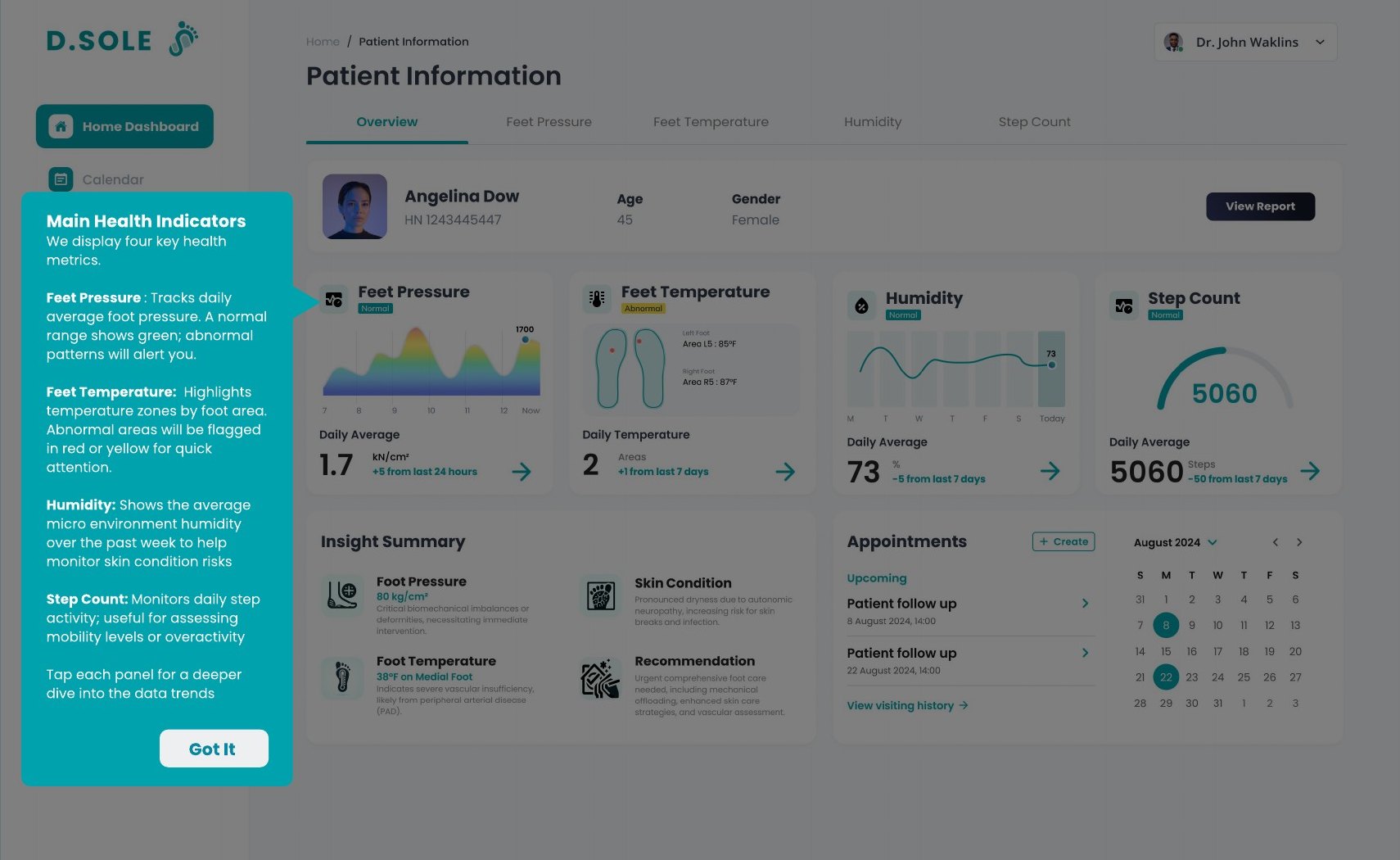
Dashboard with a teal onboarding tooltip explaining the main health indicators
01

A "Getting Started" tour

None of the podiatrists had used digital monitoring before. A step-by-step tour explains each part of the dashboard in seven short stops: patient info, the four health indicators and what green, yellow and red mean, insights, appointments, reports, help and navigation.
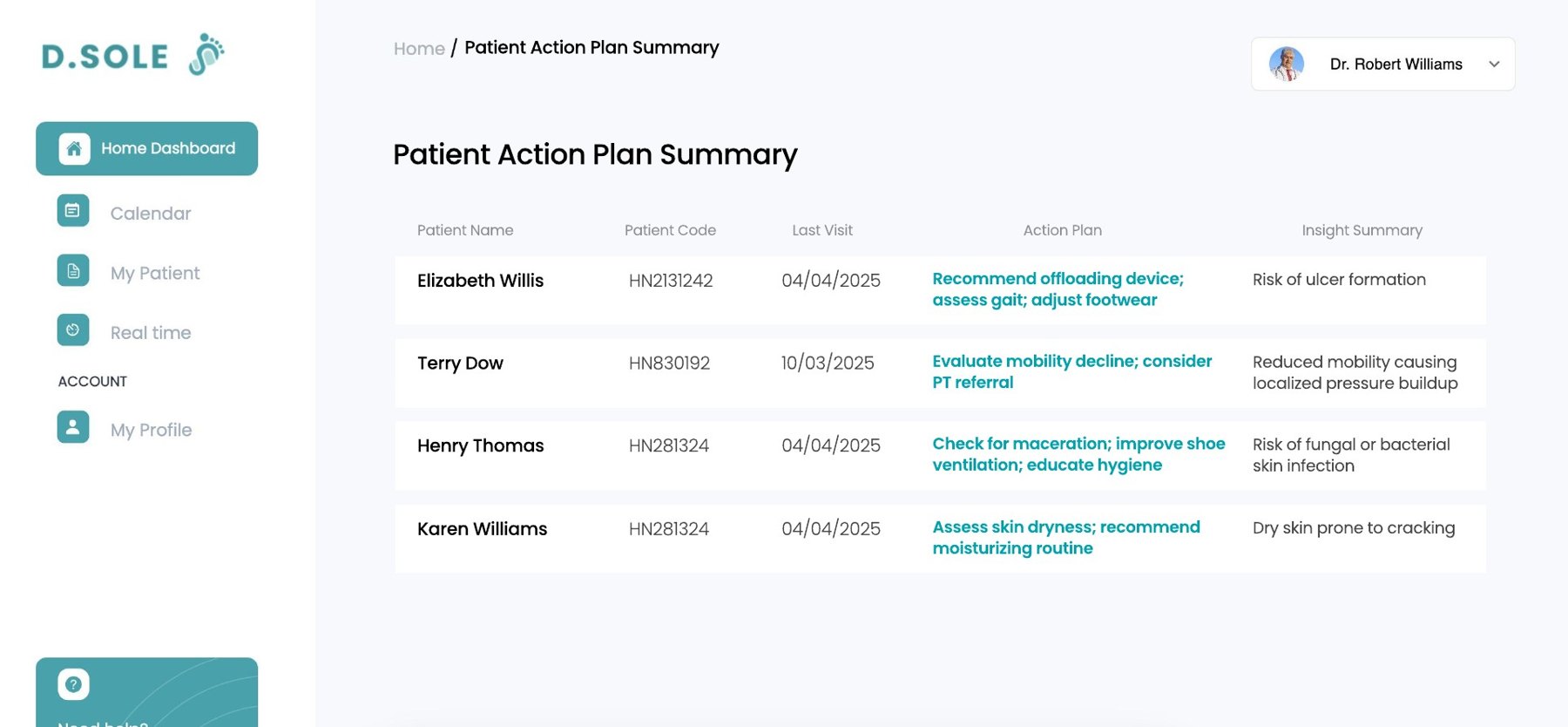
Patient action plan summary table listing patients, last visit, action plan and insight summary
02

Patient Action Plan Summary

One list of patients who need attention, each with the risk spotted and a suggested action: "Recommend offloading device; assess gait; adjust footwear." It lets a busy podiatrist triage the whole panel in a glance.
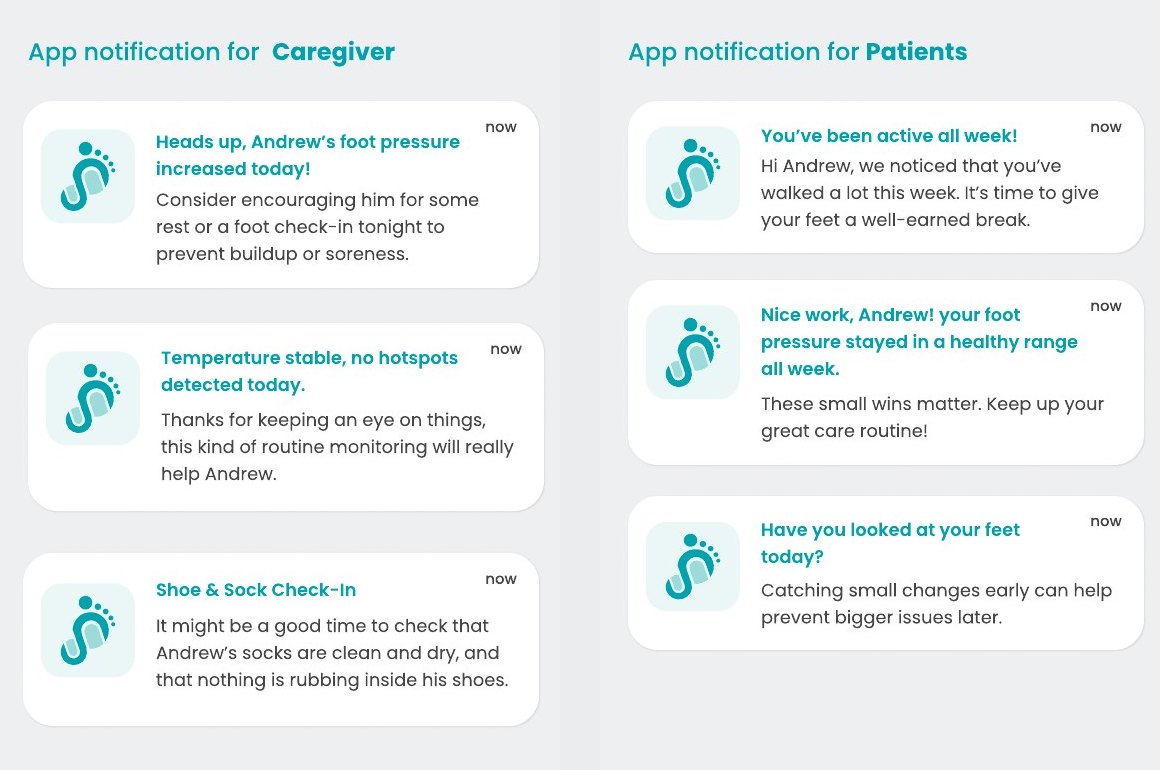
Two sets of app notifications: for caregivers, such as a heads up that foot pressure increased, and for patients, such as nice work, your pressure stayed healthy all week
03

Encouragement, not just alarms

Alerts alone can feel scary and get ignored. Messages for patients and their caregivers also celebrate progress and give gentle, practical nudges, like checking that socks are dry. Podiatrists told us involving family helps patients follow through.

Also proposed: nurse intake modeA simpler view so nurses and staff can collect basic data before the podiatrist steps in.
Also proposed: visual risk explainersClickable heatmaps and progression visuals to show patients what could happen, during the visit.
Also proposed: richer movement dataClear hydration thresholds, and walking patterns beyond step count: duration, consistency, intensity.
05 · Beyond the screen

A dashboard is one touchpoint in a whole service

To show the team where the product meets real life, we mapped a service blueprint from discovery to clinic visit, prescription and everyday use. It covers what podiatrists, nurses, the hospital and the D.Sole team each do, and where the machine learning that reads subtle changes in the foot fits in.
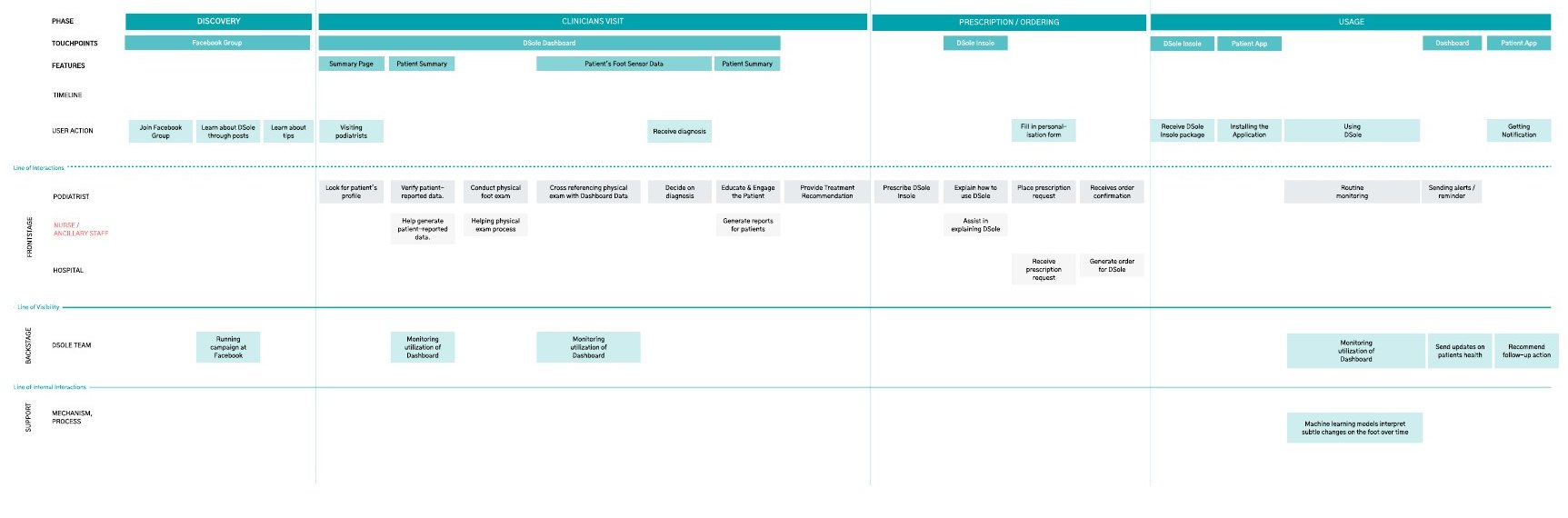
Service blueprint with phases discovery, clinician visit, prescription and ordering, and usage, across podiatrist, nurse, hospital and D.Sole team lanes
Service blueprint: podiatrist and patient workflow, and product opportunities.
Patient educationLow awareness of diabetic complications, and instructions that are hard to follow with low health literacy.
Digital literacyOlder patients can find apps intimidating, and too many notifications push both patients and clinicians away.
Access and costFootwear and insurance approvals are slow and expensive; uninsured and unhoused patients can't reach basic foot care.

What I took away

Good sensor data isn't enough if the people most at risk can't afford the insole, can't use the app, or only reach a podiatrist after an ulcer appears. The biggest opportunity we found was upstream: putting D.Sole in primary care, where it could catch risk earlier for patients who are usually seen too late.

Thank you

To the D.Sole team for welcoming me in, and to the podiatrists and physicians who made time between patients to walk us through their work.

Back to all work